Categories
What Is HDMI ARC? eARC? Differences and How They Work
Jun 13th,2025
367 Views
 In the previous article, we discussed the nature of ARC, its differences from Audio Extractors, and the advantages each offers in different scenarios.
In this article, we will explore the technology of HDMI ARC and the differences between ARC and eARC.
We also include some useful tips for using ARC audio and an introduction to other common home audio interfaces.
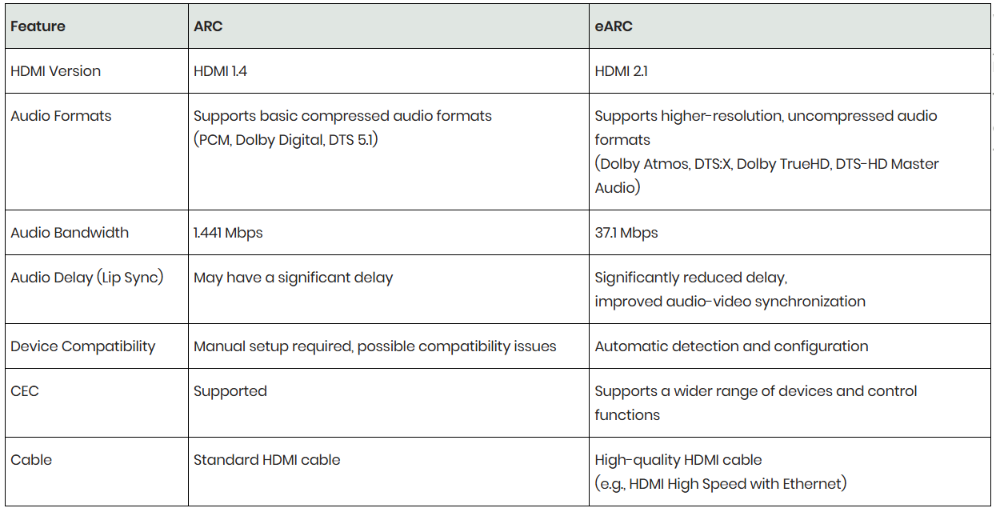
 What is HDMI ARC?HDMI ARC (Audio Return Channel) was introduced with HDMI 1.4. This feature allows audio to be sent back from a TV to an audio receiver or soundbar through a single HDMI cable, eliminating the need for an additional audio cable. For instance, if you are using a TV app like Netflix, ARC allows the TV's audio to be output directly to the audio system via the HDMI cable, providing better sound quality.What is HDMI eARC?HDMI eARC (Enhanced Audio Return Channel) is an advanced version of ARC, introduced with HDMI 2.1. eARC offers higher bandwidth and speed, supporting higher-quality audio formats, including Dolby TrueHD, DTS-HD Master Audio, and higher-resolution audio. Additionally, eARC supports automatic detection of audio sources and improved audio synchronization management. This means eARC not only provides better sound quality but also ensures more precise audio-video synchronization.ARC vs. eARC: Supported FeaturesARC and eARC differ in many features. You can find answers to questions like "Do all HDMI cables support ARC?" in the below table.
Tips for Using ARC/eARC
• Do all TVs have HDMI ARC? Not all HDMI ports support ARC. Look for labels such as "ARC" or "eARC" on HDMI ports that can be used to connect external audio equipment.


• To use ARC, you may need to enable the ARC function in the settings of both your TV and receiver.
• The method to enable ARC may vary by device. Refer to the device manual or specifications.
• If you encounter audio issues, try using a higher-quality HDMI cable or re-enable the ARC function.
• If your equipment is older, consider using ARC or an HDMI audio extractor.


